Neway Trading Guide: How to Place Orders on ESX, Trading Hours, Price Limits & Settlement
Neway lets you place orders on the Ethiopian Securities Exchange (ESX) from your phone, but the app only shows you the screens. What happens after you tap Buy is set by ESX’s trading rules: when the market opens, what prices are allowed, why an order gets rejected, and when shares and cash actually change hands.
This guide explains those rules in plain language so you know what to expect before you place your first order. If you haven’t installed the app yet, start with our Neway download guide.
What you need before your first trade
Four things have to be in place before a real order can go through:
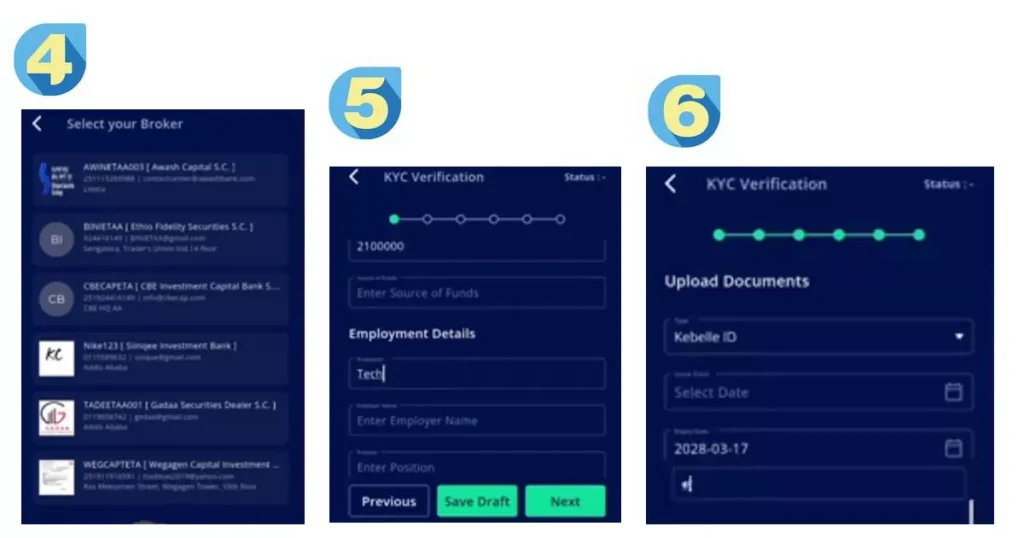
- A verified Neway investor account. Neway supports self-registration from your phone. The app tells you which documents it needs, and requirements can change, so follow its prompts instead of relying on a fixed list. Have your national ID and bank details ready.
- A trading account at the Central Securities Depository (CSD). ESX’s manual says every order must be linked to a valid CSD trading account. This is the official record of who owns which securities.
- A trading member (broker). ESX works through licensed brokers, and your account is linked to the one you choose. See the exchange’s trading members page for the current list.
- Cash in your account with that broker, if you plan to buy.
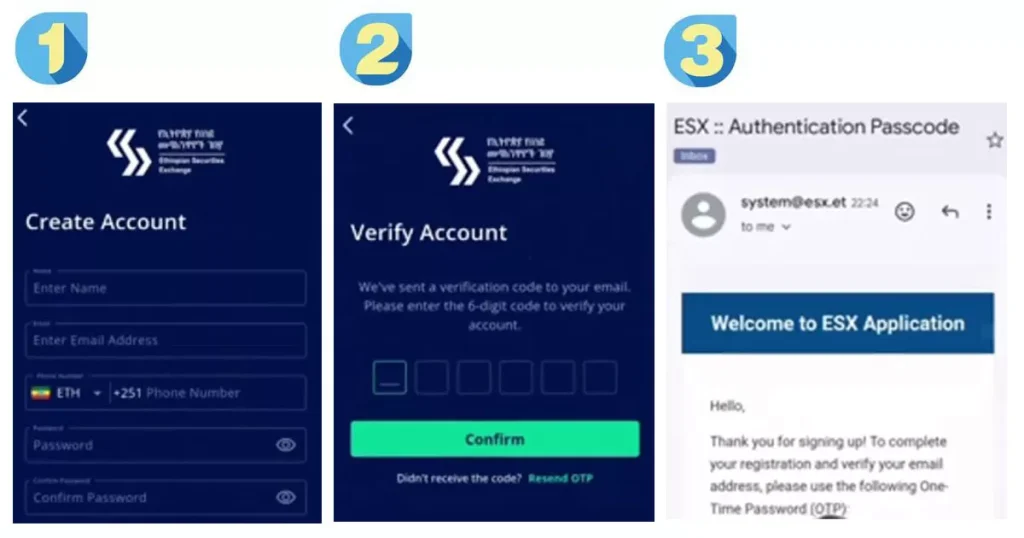
If your verification looks stuck, contact the broker you selected. They can check your application status, and registering again with the same details may only add confusion.
How your order travels
When you tap Buy or Sell in Neway, the order goes to your broker’s back-office system, then into ESX’s Automated Trading System. There it is matched against orders from other investors by price first and time second. After a match, the trade is reported to the CSD, which handles settlement. Neway is built into that same broker back-office and order system, which is why your broker and your app are tied together.
The trading day (East Africa Time)
ESX’s manual sets out these sessions:
- 8:00 – 8:59 AM, loading. Systems load market data and test connections. No orders are accepted.
- 9:00 – 9:30 AM, pre-open. You can place, change or cancel limit orders only. No trades happen. The system uses an auction to work out the official opening price.
- 9:30 AM – 3:00 PM, continuous trading. Orders match in real time.
- 3:00 PM, closing. No orders are matched. The closing price is set and becomes the reference for the next day.
- 3:30 – 5:00 PM, post-close. No new orders. Trades are finalized and reports are prepared.
ESX’s website summarizes trading as running from 9:00 AM to 3:00 PM, but the manual shows the first half hour is the opening auction, with matching starting at 9:30. ESX can change session times, so check esx.et for notices.
Order types explained
ESX’s manual lists these order types. Your app may show fewer of them, since the manual says mobile and web apps for retail investors can have a reduced set.
- Limit order: You set the highest price you’ll pay or the lowest you’ll accept. It’s the only type allowed in the pre-open. If it can’t be filled right away, it waits in the order book in line with others at the same price.
- Market order: No price set. It executes at the best available price. Allowed only in the main trading session. In a thinly traded stock, the price you get can be worse than the last price you saw.
- Stop and stop-limit orders: These activate when the price reaches a trigger level you choose. A stop order then trades at the market price, while a stop-limit order trades only within the price range you set. Main session only.
You also choose how long an order lasts:
- Day order: the default. It expires at the end of the trading day if not filled.
- Good till date (GTD) and good till cancelled (GTC): these stay open for several days, with a system default of 30 days. If the price limits move so that your price falls outside the allowed range, the order is deleted automatically at the end of the session.
Many beginners start with limit orders because they control the price, but that’s a general rule of thumb, not advice for your situation.
Price rules that decide what you can pay
- Reference price: the previous day’s closing price. Daily price limits are calculated from it.
- Circuit breaker: equities have a static limit of ±20% from the previous close. ESX can change this and can lift it in some cases, such as a security’s first trading session or after major company announcements. It doesn’t apply to fixed-income securities.
- Floor price: securities should not trade below 1 birr.
- Minimum order size: one security per order, unless ESX sets a standard lot size for a particular security.
- Tick sizes (the smallest price step you can use):
- Prices from 1 up to under 10 birr: steps of 0.01
- From 10 up to under 100 birr: steps of 0.10
- From 100 up to under 1,000 birr: steps of 1
- Above 1,000 birr: steps of 10
An order priced outside the allowed range or between valid ticks will be rejected.
New listings work differently on day one: the first price is found through a 30-minute auction, and the circuit breaker may be wider or lifted for a while.
Why Neway might reject your order
ESX’s system checks every order before accepting it. If your order is rejected, one of these checks is the likely reason:
- No valid CSD trading account linked. Your registration may not be complete, so ask your broker.
- Broker not authorized. The order must come through an authorized trading member.
- Price outside the daily limit. Move your price inside the ±20% band.
- Not enough securities (sell orders). You can only sell what’s in your CSD account.
- Not enough cash (buy orders). Your broker cash balance must cover the order.
- Quantity below the minimum lot size.
- Invalid time setting. For example, a validity period the system doesn’t accept.
Settlement: when you actually receive shares and cash
- Equities settle on a T+2 basis. That means two business days after the trade date, using delivery-versus-payment, where securities and money move together.
- Fixed-income securities settle on T+1.
If you buy on Monday, settlement is Wednesday. If you buy on Friday, settlement is the following Tuesday, because weekends don’t count. Public holidays also push the date back.
The CSD keeps the official ownership records, your broker makes sure your cash and securities are available, and settlement banks and the National Bank of Ethiopia’s payment system move the funds between brokers.
Halts, suspensions and cancelled trades
- Trading halt: ESX can pause a security for up to one session after major company news or unusual trading. A temporary pause can be 15 to 30 minutes.
- Suspension: a longer stop, for example if a company breaks disclosure rules or is being delisted.
- Cancelled trades: if a trade is executed but the settlement message can’t reach the CSD because of a technical failure, the trade can be cancelled and your holding returned to where it was before.
If a trade disappears or an order shows an odd status, confirm with your broker before placing it again.
What trading costs
ESX’s rules don’t set what you pay. Brokerage fees are set by your trading member. Before you fund your account, ask your broker:
- What commission do you charge per trade, and is there a minimum fee?
- Are there fees to deposit, withdraw or keep an account open?
- How do taxes apply to dividends and gains? (A tax professional can answer this for your case.)
Practice first with simulated trading
Neway has a simulated trading mode that uses real market data without real money. A good practice routine:
- Find one security and read its price, chart and order book.
- Place a limit order slightly below the current price and watch it sit unfilled.
- Change the price, then cancel the order.
- Try a price that breaks the tick size or the ±20% limit to see how rejections look.
- Notice how holdings and cash change over time. If simulated mode follows live rules, it may show the settlement delay too.
Before you tap Buy: a quick checklist
- Is the market in a session where this order type is allowed?
- Is my price inside the ±20% band and on a valid tick?
- Do I have enough cash (or shares) in the right account?
- Am I using a limit order, and do I know the price I’m willing to pay?
- Do I know my broker’s fees?
- Have I decided how long the order should stay open?
If the app misbehaves
Errors like a blank broker list, a “debug mode” or “jailbroken” warning, or registration failures are covered in the troubleshooting section of our download guide. For anything involving an actual order, check its status with your broker.
Frequently asked questions
What time does the Ethiopian stock market open?
Matching begins at 9:30 AM and runs to 3:00 PM East Africa Time. The 9:00 to 9:30 pre-open is for limit orders only, with an auction to set the opening price.
How long does settlement take on ESX?
Two business days (T+2) for equities and one business day (T+1) for fixed income.
What is the daily price limit?
Equities have a ±20% circuit breaker based on the previous close, which ESX can change.
Can I buy just one share?
The minimum order size is one security unless ESX sets a standard lot size for that security.
What’s the difference between a limit order and a market order?
A limit order fixes your price. A market order fixes nothing but your quantity and fills at the best available price during the main session.
Do I need a broker to trade on Neway?
Yes. Orders go through licensed ESX trading members.
Can I practice before using real money?
Yes. Use Neway’s simulated trading mode.
Sources
- ESX Main Market Trading Manual (sessions, order types, price rules, settlement)
- ESX trading and operations page
- ESX launch announcement for Neway
- Neway on Google Play and on the App Store
Before you invest
Investing involves risk, including losing the money you put in. Prices can fall as well as rise, and a young market can have few buyers and sellers. This guide is educational and not investment, legal or tax advice. Capital251 is independent and is not affiliated with ESX, Infotech, any broker or the Ethiopian Capital Market Authority. Rules can change, so confirm current details with ESX and your broker.